
#spon: I am in a partnership with Intel. Through this partnership I gain access to content, product, or other forms of value.


We love our HP Envy Rove 20 All-In-One Computer. (read more here, here, and here. It’s big and gorgeous touchscreen display makes it easy, and fun) to get things done online. The all-in-one design takes great aspects of both the desktop environment and the portable environment and mixes them together on this beautiful touchscreen pc. One of the things I love about it is that I can work from the desk or the couch without skipping a beat. (Cough. I have also been known to take it into the bathroom on occasion. For those times when I needed to pass some time…) Even though it has some of the great features that a laptop has, the fact of the matter is that it is not a laptop. While you could take it out into the backyard, it really wouldn’t be that practical to take on a cross-country flight. You need something a lot smaller for that. A mini Intel all-in-one. Well, such a thing exists and I am thrilled to say that I have been playing with it for a while now.
It’s an Intel AIO called the Acer C720P Chromebook.
The folks at Acer packed a lot of features into the C720P Chromebook.
- 11.6″ HD Widescreen LED-backlit Display
- Multi-touch screen, supporting 10-finger touch
- Intel Celeron Processor 2955U (1.4GHz, 2MB L3 cache)
- 32GB SSD Drive
- 2048MB DDR3L SDRAM Memory
- Intel HD Graphics with 128MB of dedicated system memory
- Acer InviLinkTM NplifyTM 802.11a/b/g/n (MIMO Dual-Band 2.4Ghz & 5GHz) Wireless LAN
- Bluetooth 4.0
- Built-in HD Webcam
- Two built-in stereo speakers
- 1- USB 3.0 Port
- 1- USB 2.0 Port
- 1- HDMI Port
- Full-size Acer FineTip Keyboard
- Multi-Gesture Touchpad
All of that in a cute little unit that weighs under 3 pounds and gets up to 7.5-hours of battery life!
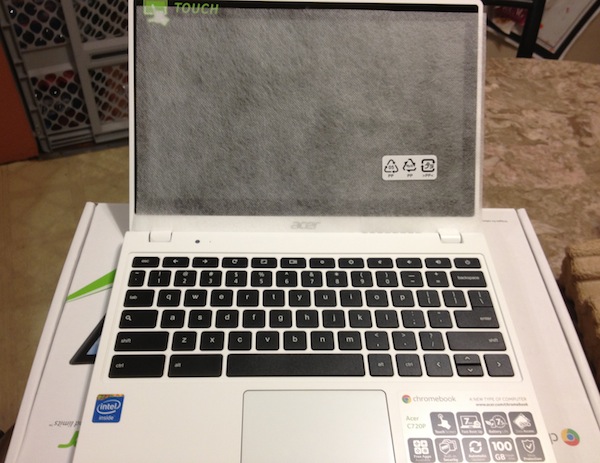
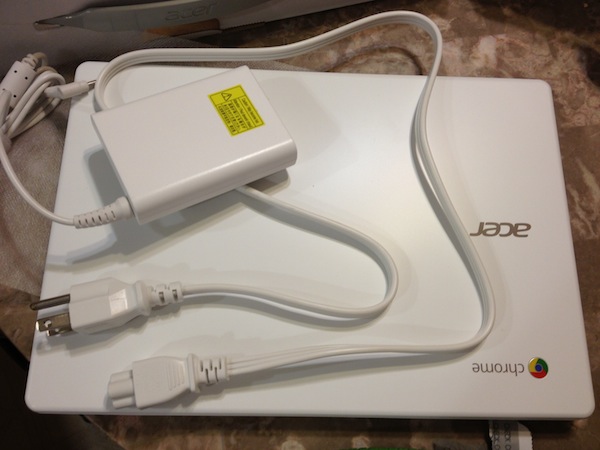
Going from unpacking (which involved opening the box and plugging it in) to start up is fast. Basically it only takes as long as you take to plug the power cord in on both ends and press the power button. Things don’t slow down there. Setup took very little time, all you need to do is choose the language you want, connect to a network and enter your gmail address. Everything else happens on it’s own. I have not once seen a message asking me to update some portion of my operating system. It’s a beautiful thing. Why is it that way? That’s easy. There’s nothing to update. Everything is browser based and lives in the cloud.
My Mom (who is not exactly tech savvy) would probably ask where the DVD drive was. There isn’t one. You don’t really need one these days anyway. The day is coming where DVD movies will no doubt be obsolete, and everything will stream from the cloud and services like Netflix. My oldest son watches almost nothing but Netflix. The Acer wasn’t hard to configure to use Netflix at all, just download the app and log in.
Speaking of my son and downloads. My son got a laptop years ago. He always treated it respectfully. Back then he used it mostly for surfing and playing games. There were several times where he wound up with a virus, obtained when dowloading exe files. Three times we had to wipe his laptop. About two years ago he managed to acquire some sort of virus we were never able to squash and that was the end of that laptop. He hasn’t had his own laptop since. He’s been eying the Chromebook ever since I unboxed it. It has disappeared on several occasions, only to be found in my son’s room.
About now my Mom would probably ask me how programs and games and such would get onto the Chromebook. As I mentioned earlier, everything in the Chromebook is browser based. It can’t run an exe file. In short, this means that the Chromebook is far less likely to get viruses like your regular desktop or laptop. The Chromebook comes with built-in access to Google Drive productivity software like Docs, Sheets and Slides. Google Drive is very convenient because anything you save there can be accessed from any computer anywhere as long as it has an internet connection. And the Chrome web store gives users access to apps for just about anything you can think from a to z including games, productivity, reference, lifestyle, social, utilities and education.

Remember earlier I mentioned how I had been thinking a mini Intel all-in-one would be cool? You may recall that my HP Envy Rove all-in-one has a touchscreen. Did I mention that the Acer C720P Chromebook has a touchscreen? Yep, this compact Intel AIO Chromebook has a touchscreen display. It’s also got a full size keyboard and touchpad. The display is quite responsive. I was able to move pretty quickly combining use of the touchpad and touchscreen. If using the touchscreen you can tap, swipe, and pinch just like you would with a tablet.
Music is huge in our family. We all love it. The little Chromebook has a lot more sound then it’s size might seem to carry. The speaker is on the bottom of the unit. I thought that maybe being on the bottom would impact volume and sound quality, so I tested music with it right side up and on its side. There was less of a difference then I expected, probably because the Chromebook has four tiny little feet on the bottom. Of course, we tend to like things on the loud side, so I was glad to find a headphone port, for those moments when we want the volume we want but don’t want to disrupt everyone.
All in all I am extremely pleased with the Acer C720P Chromebook. So is my youngest, who thinks it’s made just to surf Sprout and Disney Junior and play games like Angry Birds. So is my oldest, who has informed me he should have it for himself since he’s decided to go to college in the fall. The Chromebook has handled games, movies, surfing, social media and more with ease. It’s price point is outstanding. It’s very speedy too. It would be a great unit for students, travelers and casual computer and internet users.
Racquel
Wednesday 2nd of July 2014
This looks like a great piece. It would make it so much easier for my husband and I to both get work done at the same time with this!
Elena
Wednesday 2nd of July 2014
This sounds more streamlined than the other laptops today. It's good for a family on the go.
Amy Desrosiers
Wednesday 2nd of July 2014
A ChromeBook would make my life easier because I could access my work in a quicker manner--pretty much anywhere too!!
Sherl Bastien
Wednesday 2nd of July 2014
old laptop about dead,, new one would be great
Tammi @ My Organized Chaos
Wednesday 2nd of July 2014
Oh thats a beauty! It has a really great processor too, I love it when laptops pack a punch!